Tech PD
  • Home
  • The TechPD Blog
  • Tech PD Newsletter
  • 21st Century Education
  • Assessment w/ Tech Tools
    • Edulastic
    • Formative
    • Kahoot
    • Orange Slice Teacher Rubric
  • Beginning of the Year ~ Tech PD
  • Blogging
  • Brain Pop/ Brain Pop Jr.
  • Compass Learning
    • Compass for Teachers
    • Compass with Students
    • Compass at Home
    • Compass on a Mobile Device
    • Compass Tips & Tricks
    • Compass Troubleshooting
  • Explain Everything App
  • Filr
    • Filr ~ On an IOs device
  • Genius Hour
  • Going-Google
    • Going Google Survey
    • for Office Personnel
    • for Support Staff
  • Google Calendar
  • Google Chrome
    • Read Write Toolbar for Chrome
  • Google Classroom
  • Google Drive
  • Google Docs
  • Google Forms
    • Google Forms - Question Types
    • Forms & Flubaroo
    • Forms & AutoCrat
  • Google Hangout
  • Google Search
  • Google Sheets
  • Google Sites
  • Google Slides
  • HyperDocs
  • Informational Text Sources
  • Ipads in the Classroom
  • ISTE Standards for Students
  • Keyboarding Resources
  • New Teacher Training
  • (PLN) Personal Learning Network
  • Read Write Toolbar for Chrome
  • SAMR Model of Tech. Integration
  • Student Centered Technology Models
    • Blended Learning Model
    • Flipped Classroom
    • Personalized Learning Model (w/ tech.)
  • Tech to Improve Learning
  • Tech Time Playdates
    • BrainPop Playdate
    • Compass Playdate
    • Discovery Ed Playdate
    • Google Forms Playdate
    • Google Keep Playdate
    • Google Slides Playdate
    • Nearpod Playdate
  • Tech Tools Demo Slam
  • Twitter
    • Twitter ~ Getting Started
    • Twitter ~ What to Follow
    • Twitter Chats
    • More Twitter
    • Twitter in the Classroom
    • Twitter for Professional Learning
  • Video in the Classroom
  • Weebly
  • Word Clouds
  • YouTube
    • Youtube~ A PLN Tool
    • Why?? YouTube in the Classroom
    • Create a YouTube Playlist
    • Remove the YouTube Clutter
    • Tools that work with YouTube
    • Uploading to YouTube from an iDevice
    • Create ScreenCasts and Upload to YouTube
  • Home
  • The TechPD Blog
  • Tech PD Newsletter
  • 21st Century Education
  • Assessment w/ Tech Tools
    • Edulastic
    • Formative
    • Kahoot
    • Orange Slice Teacher Rubric
  • Beginning of the Year ~ Tech PD
  • Blogging
  • Brain Pop/ Brain Pop Jr.
  • Compass Learning
    • Compass for Teachers
    • Compass with Students
    • Compass at Home
    • Compass on a Mobile Device
    • Compass Tips & Tricks
    • Compass Troubleshooting
  • Explain Everything App
  • Filr
    • Filr ~ On an IOs device
  • Genius Hour
  • Going-Google
    • Going Google Survey
    • for Office Personnel
    • for Support Staff
  • Google Calendar
  • Google Chrome
    • Read Write Toolbar for Chrome
  • Google Classroom
  • Google Drive
  • Google Docs
  • Google Forms
    • Google Forms - Question Types
    • Forms & Flubaroo
    • Forms & AutoCrat
  • Google Hangout
  • Google Search
  • Google Sheets
  • Google Sites
  • Google Slides
  • HyperDocs
  • Informational Text Sources
  • Ipads in the Classroom
  • ISTE Standards for Students
  • Keyboarding Resources
  • New Teacher Training
  • (PLN) Personal Learning Network
  • Read Write Toolbar for Chrome
  • SAMR Model of Tech. Integration
  • Student Centered Technology Models
    • Blended Learning Model
    • Flipped Classroom
    • Personalized Learning Model (w/ tech.)
  • Tech to Improve Learning
  • Tech Time Playdates
    • BrainPop Playdate
    • Compass Playdate
    • Discovery Ed Playdate
    • Google Forms Playdate
    • Google Keep Playdate
    • Google Slides Playdate
    • Nearpod Playdate
  • Tech Tools Demo Slam
  • Twitter
    • Twitter ~ Getting Started
    • Twitter ~ What to Follow
    • Twitter Chats
    • More Twitter
    • Twitter in the Classroom
    • Twitter for Professional Learning
  • Video in the Classroom
  • Weebly
  • Word Clouds
  • YouTube
    • Youtube~ A PLN Tool
    • Why?? YouTube in the Classroom
    • Create a YouTube Playlist
    • Remove the YouTube Clutter
    • Tools that work with YouTube
    • Uploading to YouTube from an iDevice
    • Create ScreenCasts and Upload to YouTube
Picture

Uploading to YouTube from an iDevice

You are able to create your own content and upload it to YouTube.  Depending on what device or software you use will determine how easy or difficult this process is.  

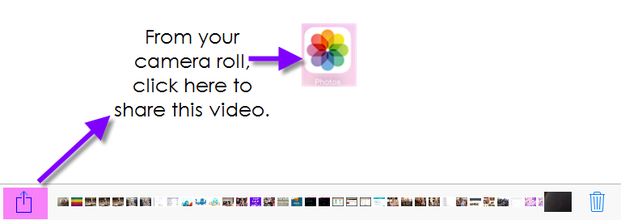
From an iPad or iPhone:
Picture
Step 1:  

Picture
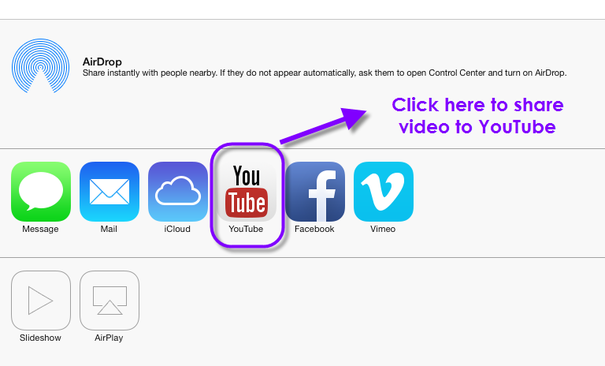
Step 2:  

Picture
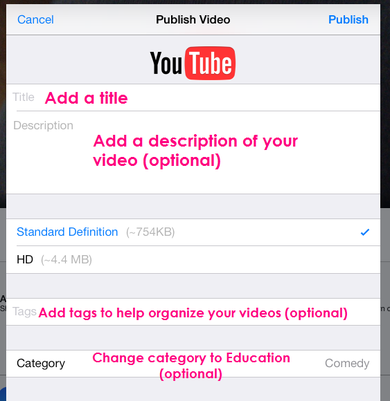
Step 3:  
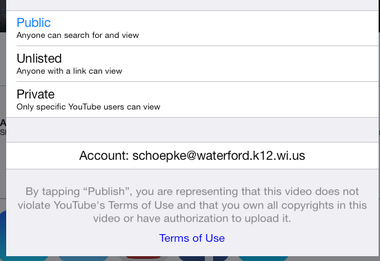
To choose the proper privacy settings, keep this in mind:
  • A private video can only be seen by you and the users you select. The video won’t appear on your channel or search results and will be invisible to other users.
  • Making a video unlisted means that only people who have the link to the video can view it. To share an unlisted video, just share the link with the people who you’d like to have access to it, and they’ll then be able to see it. Unlike private videos, the people you share the video with do not need to have a Google account to see the video, and they can share with more people simply by forwarding the link to them.

Click here to read more about these settings. (This text was highlighted using the Scrible toolbar.)

I would recommend making your videos, in most cases, unlisted.

Picture
If the account listed is not your account, click on the listed account, sign out and then sign in with the correct account.

To Learn More about this tool, choose a topic below.


WHY????? YouTube in the Classroom  
Create a YouTube Playlist
Remove the YouTube Clutter
Tools that work with YouTube 
Uploading to YouTube from an iDevice
Create a Screen Cast and Upload to YouTube   

  • Home
  • The TechPD Blog
  • Tech PD Newsletter
  • 21st Century Education
  • Assessment w/ Tech Tools
    • Edulastic
    • Formative
    • Kahoot
    • Orange Slice Teacher Rubric
  • Beginning of the Year ~ Tech PD
  • Blogging
  • Brain Pop/ Brain Pop Jr.
  • Compass Learning
    • Compass for Teachers
    • Compass with Students
    • Compass at Home
    • Compass on a Mobile Device
    • Compass Tips & Tricks
    • Compass Troubleshooting
  • Explain Everything App
  • Filr
    • Filr ~ On an IOs device
  • Genius Hour
  • Going-Google
    • Going Google Survey
    • for Office Personnel
    • for Support Staff
  • Google Calendar
  • Google Chrome
    • Read Write Toolbar for Chrome
  • Google Classroom
  • Google Drive
  • Google Docs
  • Google Forms
    • Google Forms - Question Types
    • Forms & Flubaroo
    • Forms & AutoCrat
  • Google Hangout
  • Google Search
  • Google Sheets
  • Google Sites
  • Google Slides
  • HyperDocs
  • Informational Text Sources
  • Ipads in the Classroom
  • ISTE Standards for Students
  • Keyboarding Resources
  • New Teacher Training
  • (PLN) Personal Learning Network
  • Read Write Toolbar for Chrome
  • SAMR Model of Tech. Integration
  • Student Centered Technology Models
    • Blended Learning Model
    • Flipped Classroom
    • Personalized Learning Model (w/ tech.)
  • Tech to Improve Learning
  • Tech Time Playdates
    • BrainPop Playdate
    • Compass Playdate
    • Discovery Ed Playdate
    • Google Forms Playdate
    • Google Keep Playdate
    • Google Slides Playdate
    • Nearpod Playdate
  • Tech Tools Demo Slam
  • Twitter
    • Twitter ~ Getting Started
    • Twitter ~ What to Follow
    • Twitter Chats
    • More Twitter
    • Twitter in the Classroom
    • Twitter for Professional Learning
  • Video in the Classroom
  • Weebly
  • Word Clouds
  • YouTube
    • Youtube~ A PLN Tool
    • Why?? YouTube in the Classroom
    • Create a YouTube Playlist
    • Remove the YouTube Clutter
    • Tools that work with YouTube
    • Uploading to YouTube from an iDevice
    • Create ScreenCasts and Upload to YouTube